Cue by Audivox · in private build

CRMs are so 1998.Meet Cue, the Sales Operating System.

Everything a phone-based sales team needs to work a lead, from the first ring to the finished sale.

Cue combines calling, guided conversations, routing, customer history, notes, tasks, follow-ups, automation, reporting and a built-in sales CRM in one agent desktop.

Use Cue as the complete sales system for a growing team, or connect it to Salesforce and the rest of your existing stack when the business demands more.

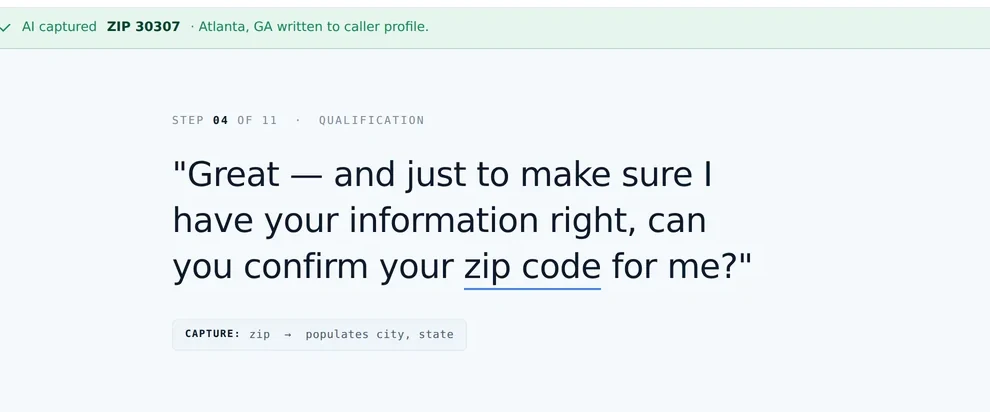
The Cue call workspace: the current script step held large on screen while the consumer profile fills in on the right as the customer answers.

The call workspace. Step 04 of 11, the ZIP captured as it was spoken.

The distinction

Salesforce manages the complexity surrounding the sale.
Cue manages the sale itself.

Enterprise complexity

Lead Qualification Conversion to Opp Stage 1 Engineering Conversation Client sign off Overseas production Client review Legal Finance Conversation Sales back to the start

Salesforce is excellent when a deal has to move through multiple departments, specialists, approvals, documents and months of internal coordination. That is a real problem and it deserves a real platform.

The cost of that power is the shape of it. Objects, layouts, permissions, and somebody whose job is keeping all three true. Worth paying when the deal really does cross seven departments.

A clear sales finish line

Lead Conversation Next best step Sale the finish line is one of these
  • Appointment booked
  • Payment captured
  • Application submitted
  • Policy enrolled
  • Consultation retained
  • Estimate scheduled

Most phone-based teams do not need an enterprise transformation project. They need every lead worked correctly, and every sale moved toward a defined outcome.

The operating model

One surface, from the first ring to the finished record.

The dialer should know the script. The script should know the customer. The customer record should know what happened on the call. The next action should not depend on a rep remembering it later.

Cue connects those pieces while the sale is happening.

01Lead arrives 02Routed to theright agent 03Call begins 04Cue guides theconversation 05Answers capturedautomatically 06Stage and nextaction updated 07Follow-up triggered 08Sale completed 09Record storedor pushed out
Steps 04 to 06 happen while the customer is still on the line. That is the part most stacks do after the call, from memory.

The record

The customer record is not an afterthought.

Cue stores the information a sales team actually needs, tracks where every lead stands, and automates what should happen next. For many teams, that is the CRM.

Contacts and historyEvery touch on one record
Calls and transcriptsWhat was said, and when
NotesWritten during the call, not after
TasksOwned, dated, visible
Follow-upsScheduled from the call itself
Sales stagesDefined once, applied the same way
Custom fieldsThe things your business asks
Applications and productsWhat they actually bought
AppointmentsBooked on the call, confirmed after
Payments and completionsThe finish line, recorded
Agent ownershipWho has it, and since when
ReportingStage to stage, agent to agent
Testing and conversionWhich script version wins
Marketing automationTriggered by the call itself
Consent and disclosuresCaptured at step one, stored with the call
Lead source and costWhere it came from, what it took

Use Cue on its own. Connect it when you outgrow it.

For companies with more complex processes, Cue pushes a structured record into Salesforce, HubSpot, GoHighLevel or another system once the sales work is done. The integration is an option, not a requirement.

Pushes to

SalesforceHubSpotGoHighLevelWebhook to anything
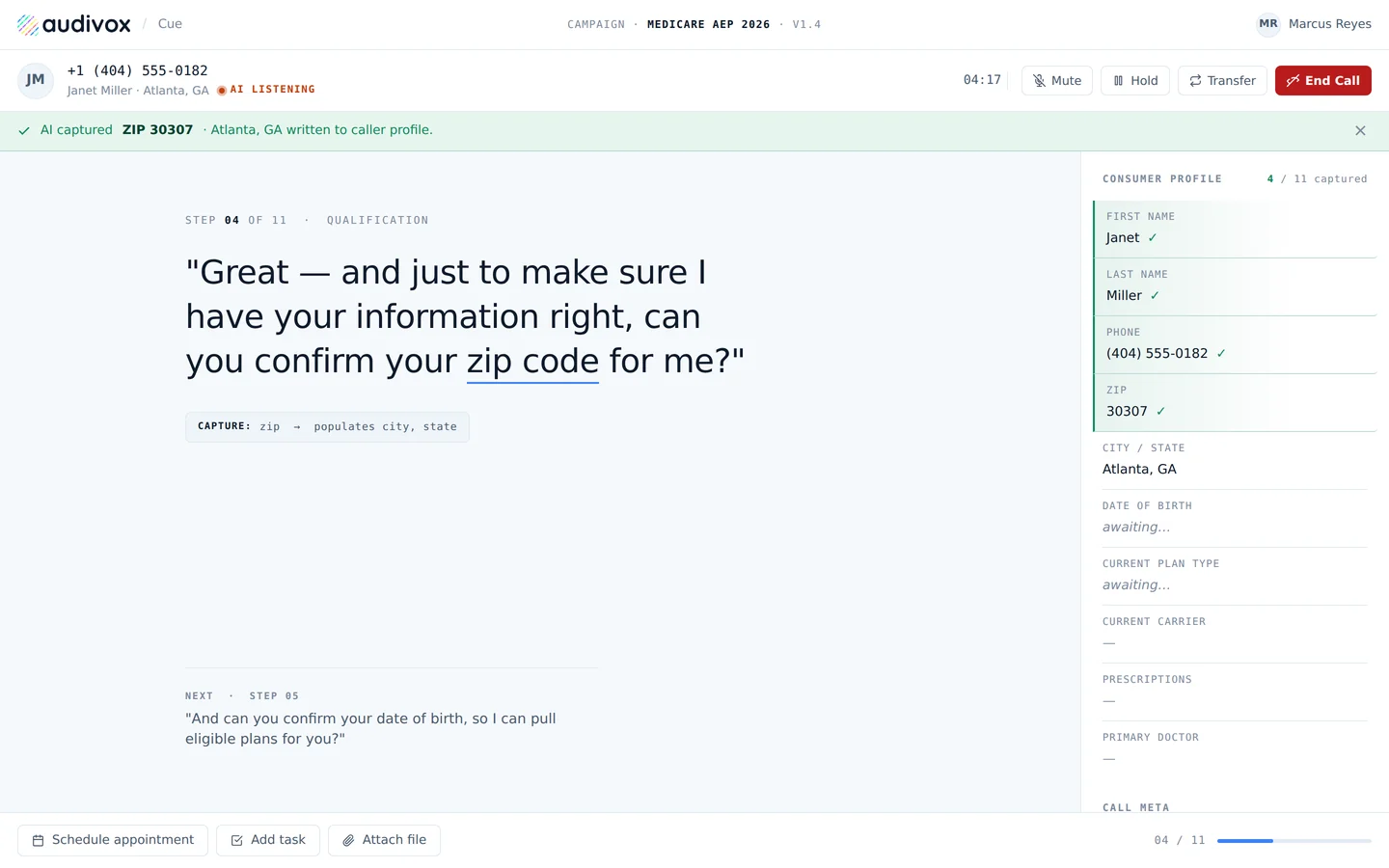
A single script step held large on screen, with the AI capture banner confirming the ZIP was written to the caller profile.

01 · The call workspace

The agent always knows what comes next.

The current step stays visible at reading-glance size, answers are captured as the customer speaks, and the next step is already on screen. When the AI hears the answer the field fills and Cue advances. When judgment is needed, the agent moves it forward themselves. Both are the same motion.

  • End Call never moves. Safety-critical actions stay in one place, always one click away.
  • Consent captured at step one, recorded and stored with the transcript.
  • Transfer and callback scheduling without leaving the conversation.
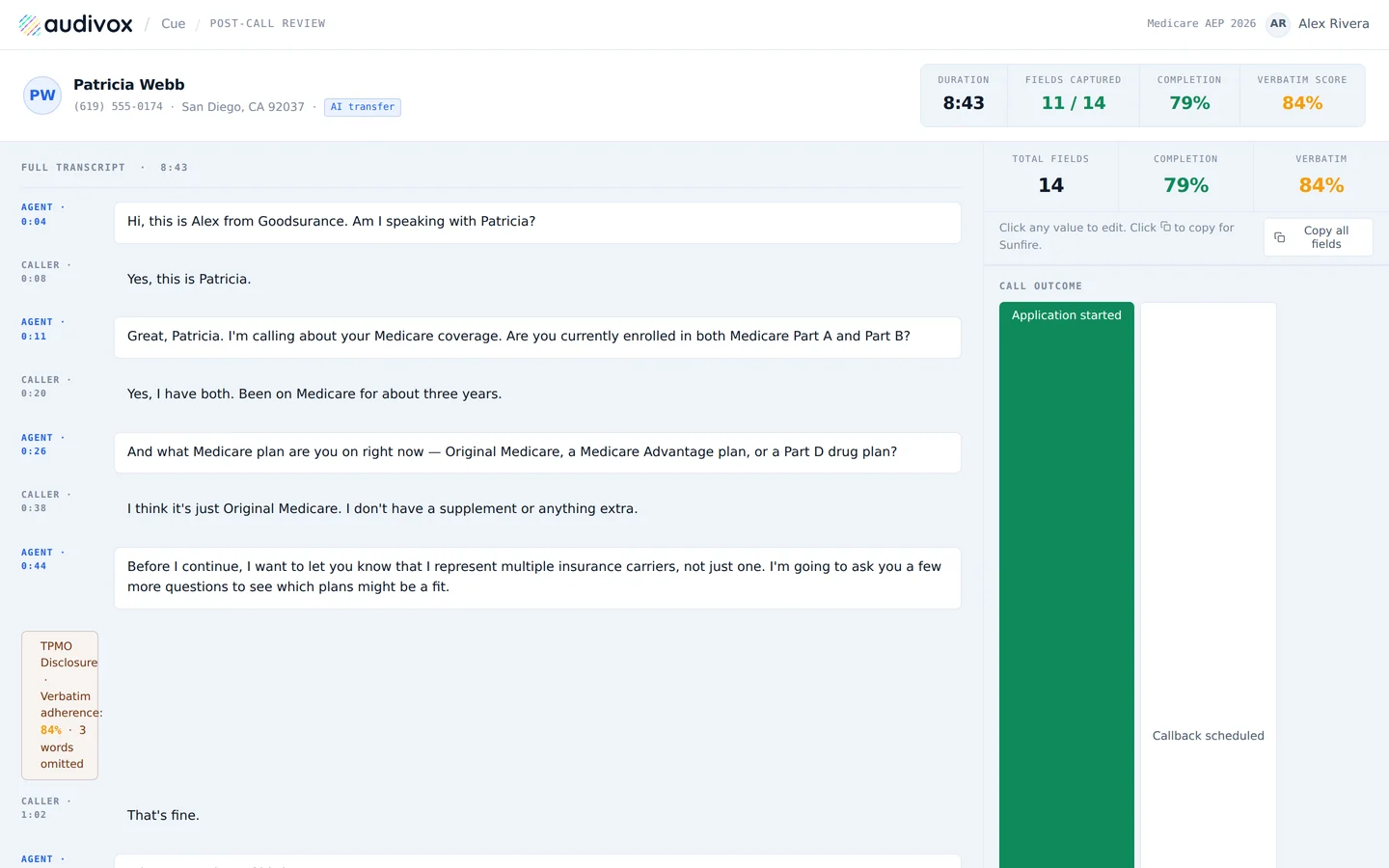
Post-call review with the transcript on the left and captured fields, completion and verbatim scores on the right.

02 · The customer record

Calls, notes, fields and follow-ups stay attached to the customer.

Not scattered across tabs, not living in one rep's notebook. Transcript on the left, the record on the right, AI-captured fields badged so provenance is never a guess. The agent corrects anything wrong inline and the record is closed.

  • Verbatim scoring against the script. The screen above shows 84 percent, with three words omitted on a required disclosure. That is a compliance problem you can see before a carrier does.
  • Completion and field counts per call, so coaching stops being an opinion.
  • Push out when you want to, to your CRM or as CSV.
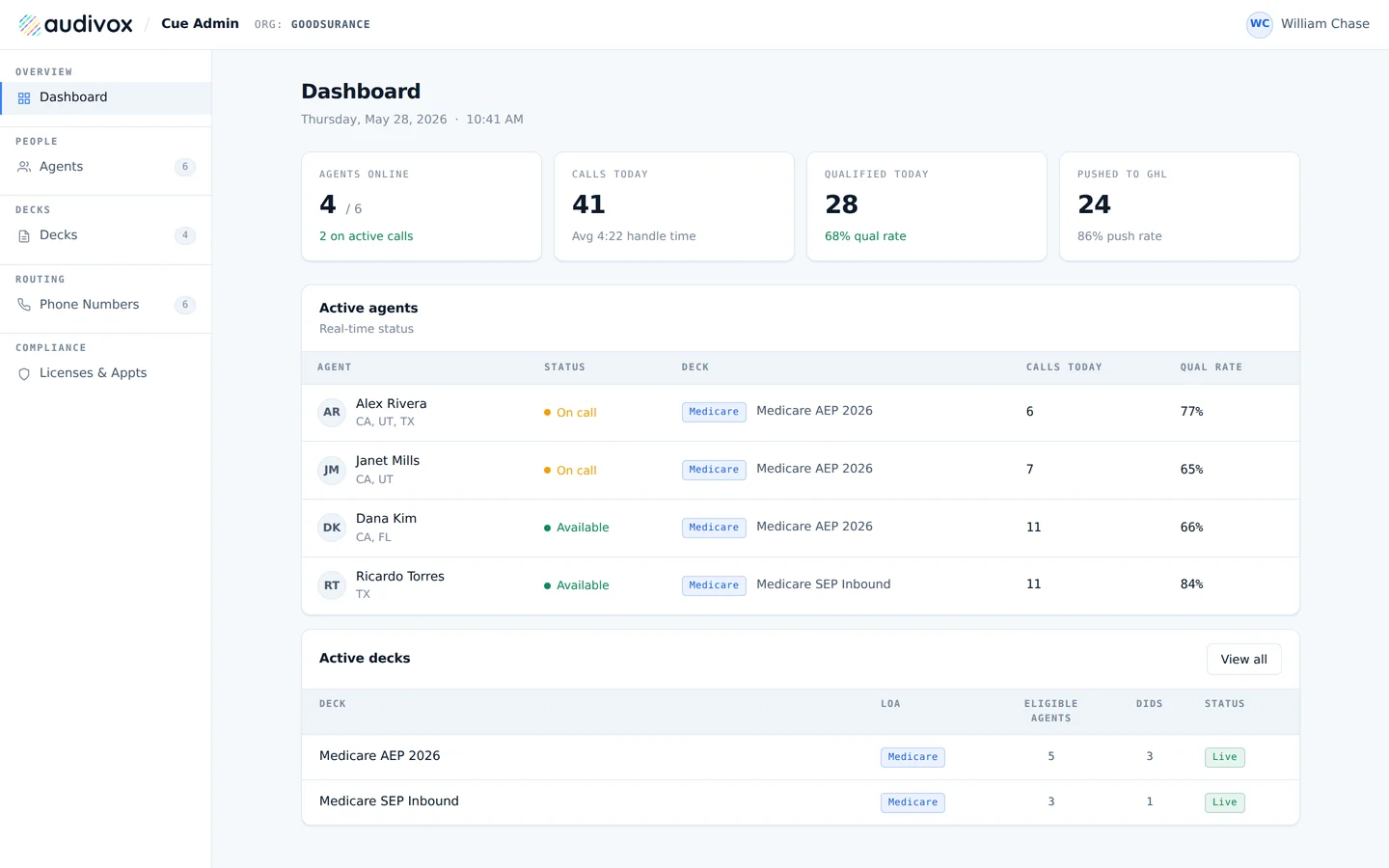
The operator dashboard with agents online, calls today, qualified today, pushed to CRM, and a live agent table.

03 · The operator view

Who is calling, what is converting, where leads are stopping.

Calls today, qualified today, reached the finish line today. The gap between those three numbers is the only conversation worth having on Monday morning, and it is on the screen instead of in a spreadsheet somebody rebuilds every week.

  • Live agent status by deck, with per-agent qualification rate.
  • Licenses and appointments by state and carrier, treated as a routing input rather than paperwork.
  • Numbers and routing under the same roof as the script they answer with.
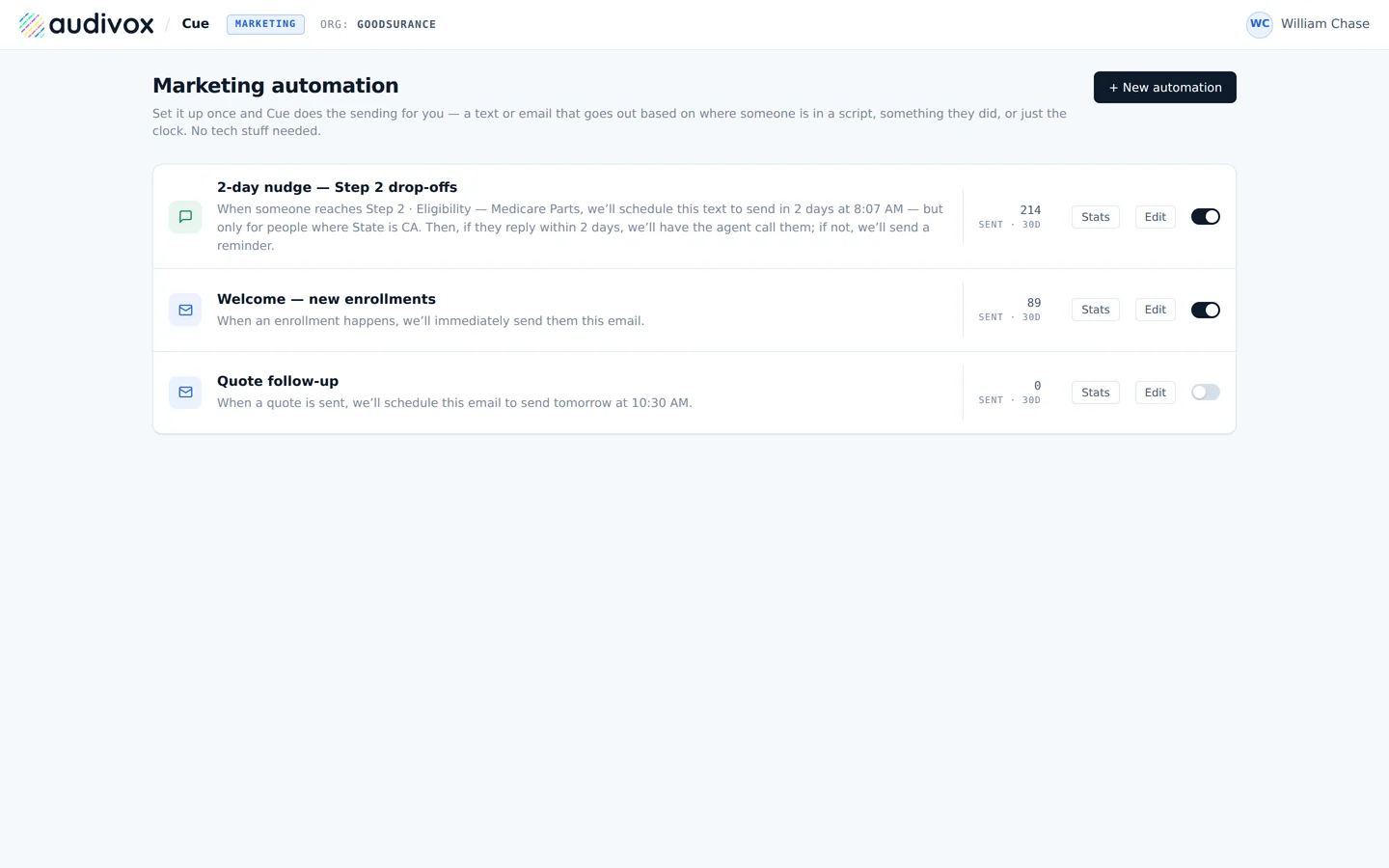
Automation rules that fire a text or email from a script step, an event, or the clock.

04 · Automation

Follow-up triggered by what actually happened.

The stage they reached, the answer they gave, the appointment they booked, or the step where the conversation stopped. Set once, in plain language. No workflow canvas and no consultant.

  • Triggered by the step they died on, which is the follow-up most stacks cannot express at all.
  • Branching on reply, so an answer routes to an agent and silence routes to a reminder.
  • Sends counted per rule, so a rule doing nothing is visible instead of forgotten.
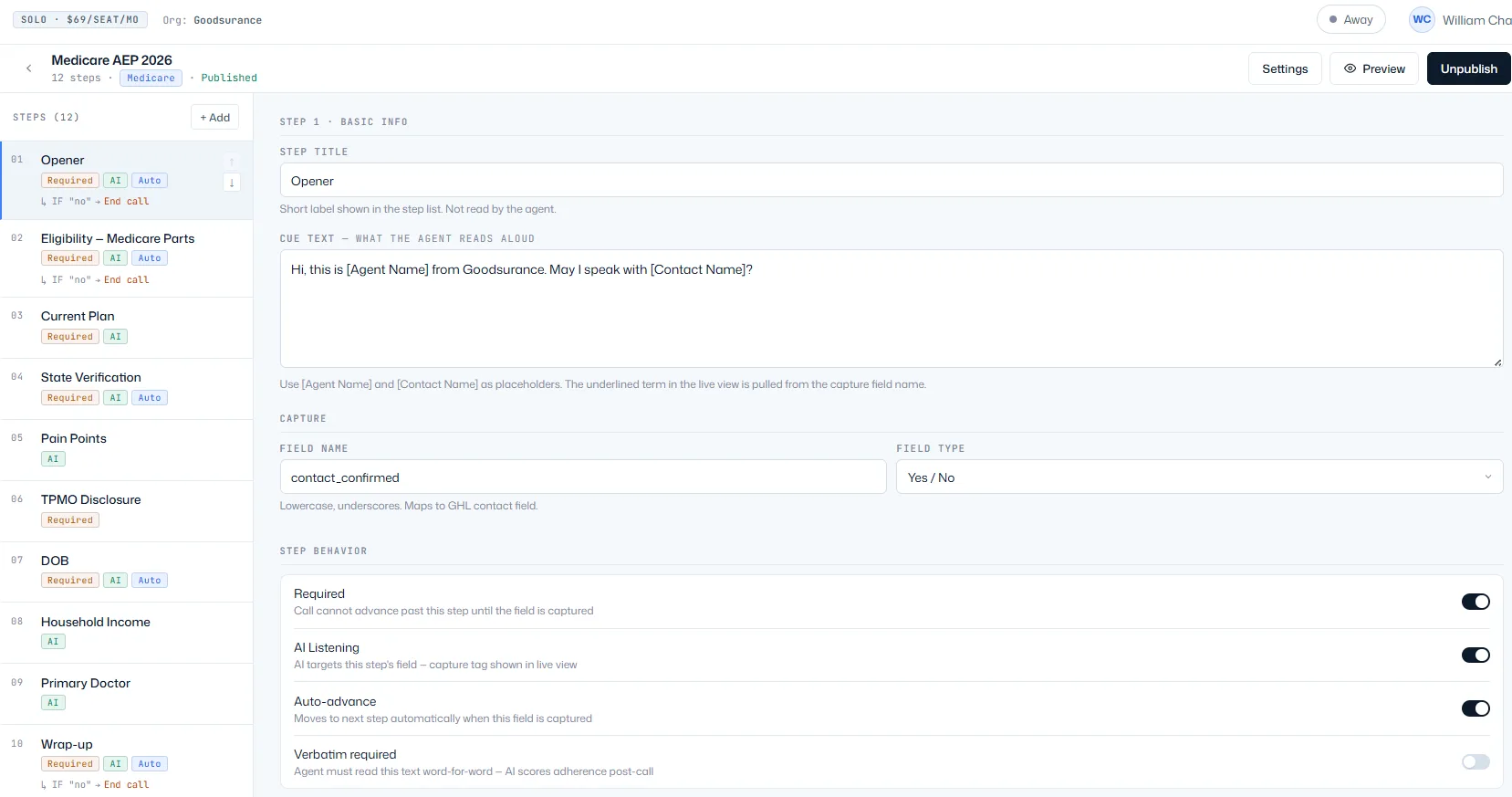
The process builder: a list of script steps on the left, the selected step's cue text, capture field and step behavior toggles on the right.

05 · The process builder

Your steps, in order, in plain text.

The script is a list of steps with what to say and what to listen for. Add, edit, reorder, publish. Each step declares its capture target and whether it is required, and required fields are what gate the advance. Versioned, so publishing does not break a call already in progress.

  • No code, no JSON, no canvas. If you can write the step, you can ship it.
  • Built by you, or with us in a working session.

Fit

Built for teams with a clear finish line.

Roughly one to twenty-five people, selling in conversations, with a defined thing that has to happen at the end.

Medicare and insurance agencies

Guide the call, capture the required disclosures, submit the application and retain the complete customer history.

Law firms

Qualify the matter, book the consultation, collect the intake details and track the client through retention.

Financial services

Work the enquiry through eligibility, complete the application and capture the payment without leaving the conversation.

Home services

Answer the lead while intent is warm, book the estimate against real availability, and confirm it automatically.

Appointment-based businesses

Answer, find availability, schedule, and automate the confirmation and the reminder that stops the no-show.

Healthcare and enrollment teams

Run the eligibility questions the same way every time, record consent, and finish the enrollment on the call.

Small call centers

One script per campaign, routing by fit and license, and a supervisor view that shows where the room is stalling.

Founder-led sales teams

The process in the founder's head, written down once, so the second and third hire sell the way the founder does.

The boundary

Some companies should use Salesforce.

If your sales process requires engineering reviews, complex quoting, procurement, legal approvals, implementation teams, international production, or months of cross-functional work, Salesforce may be exactly the right tool. That is the problem it was built for and it solves it well.

Cue can still run the customer conversation and send the resulting record into that process.

But most small phone-based sales teams should not need an enterprise CRM implementation just to book an appointment or submit an application.

Private build

Your sales team needs an operating system, not another database.

Cue is currently in private build. We are working with phone-based sales teams that want one system for conversations, customer records, follow-up, and the work required to complete the sale.

Or email william@audivox.ai. Cue gets its own home at cue.audivox.ai when there is a product to sign up for. This page is the honest version until then.